Google Improves YouTube TrueView Video Ad Analytics
Advertisers and marketers know the value of YouTube TrueView video ads, which are skippable so the advertiser only pays for wanted views. Thanks to changes in Google Analytics, its now easier to monitor the performance of these ads.
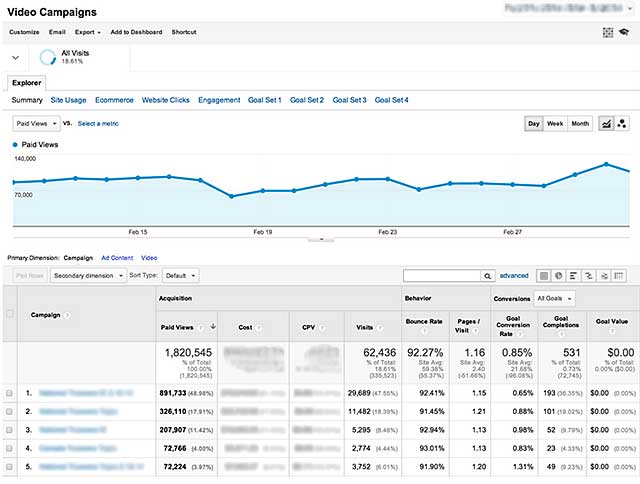
To view ad performance, advertisers need to link their Google Analytics and AdWords accounts. Then, they can view a new video report under Acquisition/AdWords/Video Campaigns.
 The analytics are similar to other AdWords pages, but include video-only metrics such as Paid Views, Cost Per View, and Website Clicks. Google also offers engagement reporting, to see how viewers interact with both the video and the brand website.
These new analytics give advertisers the ability to tinker with their TrueView video campaigns and fine-tune performance. The reports show how video views lead to website traffic, even when the viewer doesn't click on the ad itself.
For anyone who hasn't run a TrueView campaign yet and wants to get started, the first step is to link your AdWords and Google Analytics accounts, then sign into your AdWords account and create a new video campaign. Google lets you set a daily budget so you'll know exactly how much you're spending. You can also target your ads to the demographics you're trying to reach.
For more, read the Google blog post announcing the change.
Troy Dreier's article first appeared on OnlineVideo.net